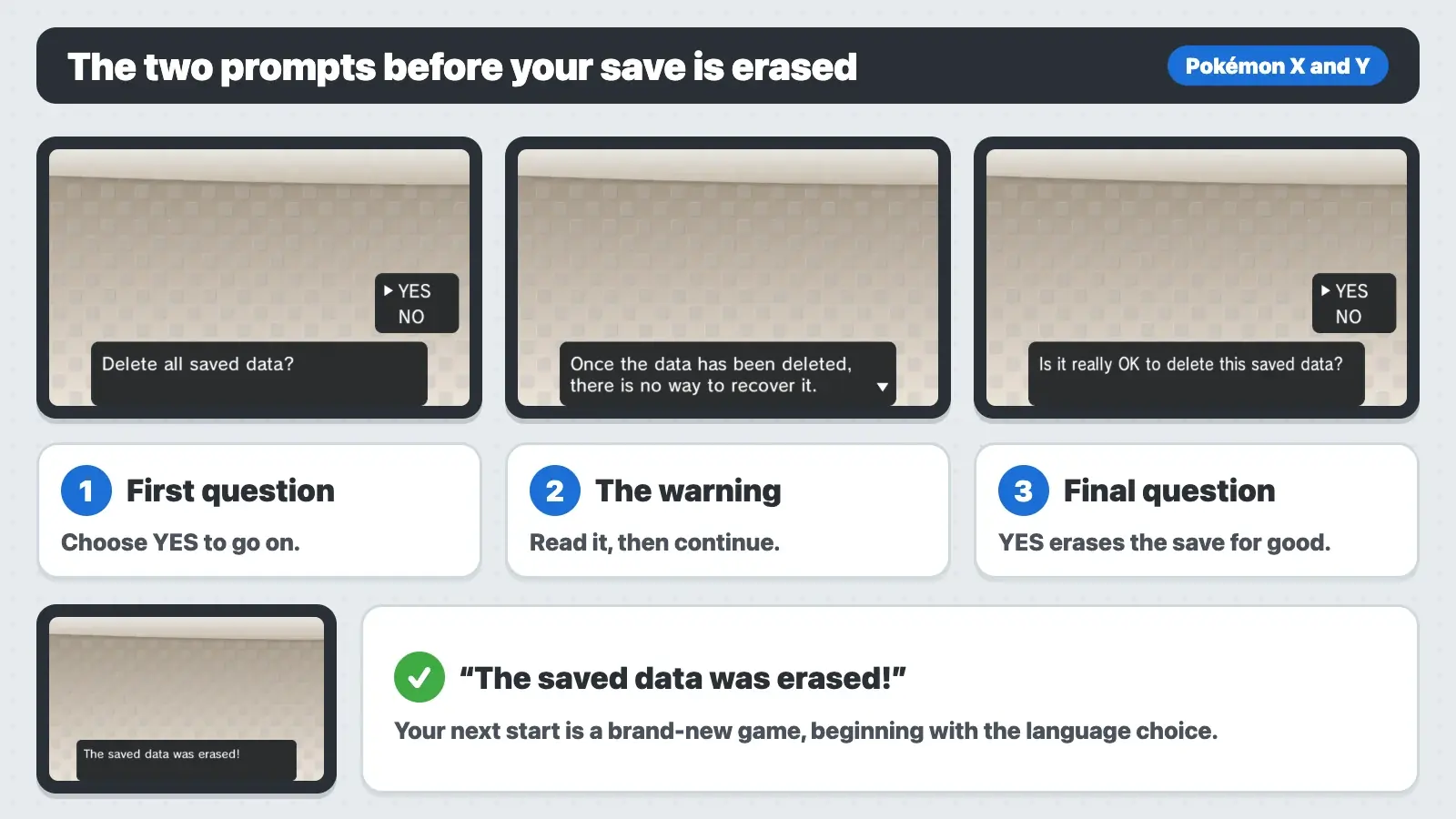
To reset Pokémon X and Y, start the game and, on the title screen, hold Up on the +Control Pad, the B Button and the X Button at the same time. This works on Game Card and download copies. The game asks “Delete all saved data?” Choose YES. It warns you that the data can’t be recovered and asks “Is it really OK to delete this saved data?” Choose YES again, and you’ll see “The saved data was erased!” Your next start is a brand-new game. There’s no New Game option on the menu because X and Y keep only one save file. Up + Select + B is the old DS combo and does nothing here. The steps are the same in Pokémon Y.
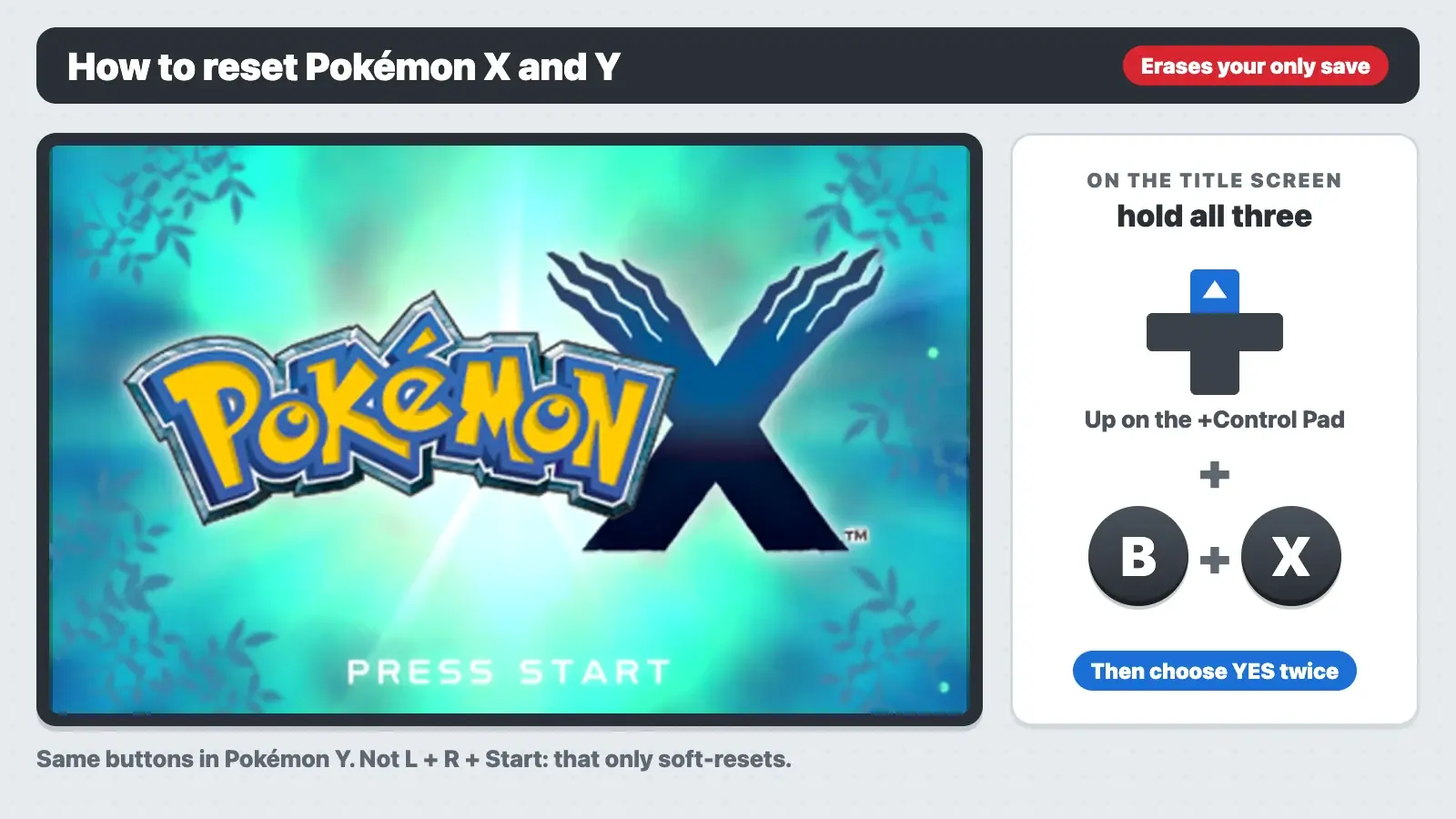
Resetting Pokémon X and Y at a glance
| Question | Answer |
|---|---|
| Delete-save buttons | Up on the +Control Pad + B + X, held together |
| Where | The title screen, before you press Start or A. If the game shows a save error, press the same buttons on that error screen |
| Confirmations | Two. Choose YES at “Delete all saved data?” and again at “Is it really OK to delete this saved data?” |
| How many save files? | One per Game Card or download |
| Other ways to delete | Game Card: none. Download version: deleting the software in System Settings also deletes the save |
| Is there a New Game button? | No. The title menu only has CONTINUE and the link options once a save exists |
| Soft reset (not a delete) | L + R + Start or L + R + Select |
| Can I undo it? | No. Every Pokémon and item on the save is gone |
| Pokémon Y | Same buttons, same prompts |
How to delete your save and start a new game
On a Game Card, this is the only way to start over. On a download version it’s also the easiest way, because the game stays installed. Before you do it, read what to do first, because the save can’t come back.
- Start Pokémon X or Y from the HOME Menu. Wait until you see the logo and “PRESS START”.
- Hold Up on the +Control Pad, B and X together. Use the cross-shaped +Control Pad, not the Circle Pad. Press all three at once. If nothing happens, try again and keep them held a little longer.
- Choose YES at “Delete all saved data?” If you change your mind, choose NO.
- Read the warning. It says “Once the data has been deleted, there is no way to recover it.” Then continue to the next question.
- Choose YES at “Is it really OK to delete this saved data?” This is the real delete.
- Wait for “The saved data was erased!” Then start the game again. A new game begins with the language choice.
The electronic manual says the same thing. Open it from the HOME Menu (tap Manual with X or Y selected). Under Erasing Your Game, it says that “if you wish to start again from the beginning, you will first have to erase your saved-game file,” and that you do this by pressing Up, B and X “simultaneously from the title screen.” It adds that an erased file “cannot be recovered” and that “all of your Pokémon and items will be lost.” Elsewhere it notes that you can only keep one saved-game file.
You don’t have to save the new game straight away. The old file is already gone the moment you see “The saved data was erased!”, whether or not you save again.
Held the buttons and nothing happened?
Check these in order:
| What you did | Why it failed | Fix |
|---|---|---|
| Held Up + Select + B | That’s the Nintendo DS games’ combo (Diamond to Black 2 and White 2) | Use Up + B + X |
| Pressed Start first, then the buttons | You’re on the CONTINUE menu, past the title screen | Close the game from the HOME Menu, start it again, and press the combo on the logo screen |
| Used the Circle Pad | The combo needs the +Control Pad | Press Up on the cross-shaped pad |
| Pressed the buttons one by one | The game checks for all three at once | Hold B and X, then add Up, and keep holding |
| Looked in System Settings | A Game Card save isn’t stored on the 3DS | Use the title-screen combo |
| A button on your 3DS is worn | The game never sees all three inputs | Test the buttons in another game first |
Seeing a save error instead of the title screen? Read the message first, because X and Y have several different ones:
- “The saved game data is corrupted.” The game can’t read the save and tells you to check the electronic manual. The manual’s “When Saving Fails” section says that in this case you can’t get back to the title screen. Press Up, B and X together on that error screen and follow the messages.
- “The saved data is not compatible with this version, so it can’t be used.” This is a version problem, not a broken save. Install the latest update (Ver. 1.5) before you think about erasing.
- “Repairing your saved data. Do not turn off the power.” Leave the system on and let it finish. Don’t erase a save while the game is repairing it.
- “The data in the SD Card is corrupted.” This is about the extra data on the SD Card, not the save on a Game Card. The game offers to initialize that data with the A Button.
Delete save vs. soft reset vs. System Settings
“Reset” means two different things in Pokémon. A soft reset just restarts the game from your last save. Use it to retry a battle or to hunt a better Nature or a Shiny on a static Pokémon. It never deletes anything. A delete wipes the save so you can start a new adventure.
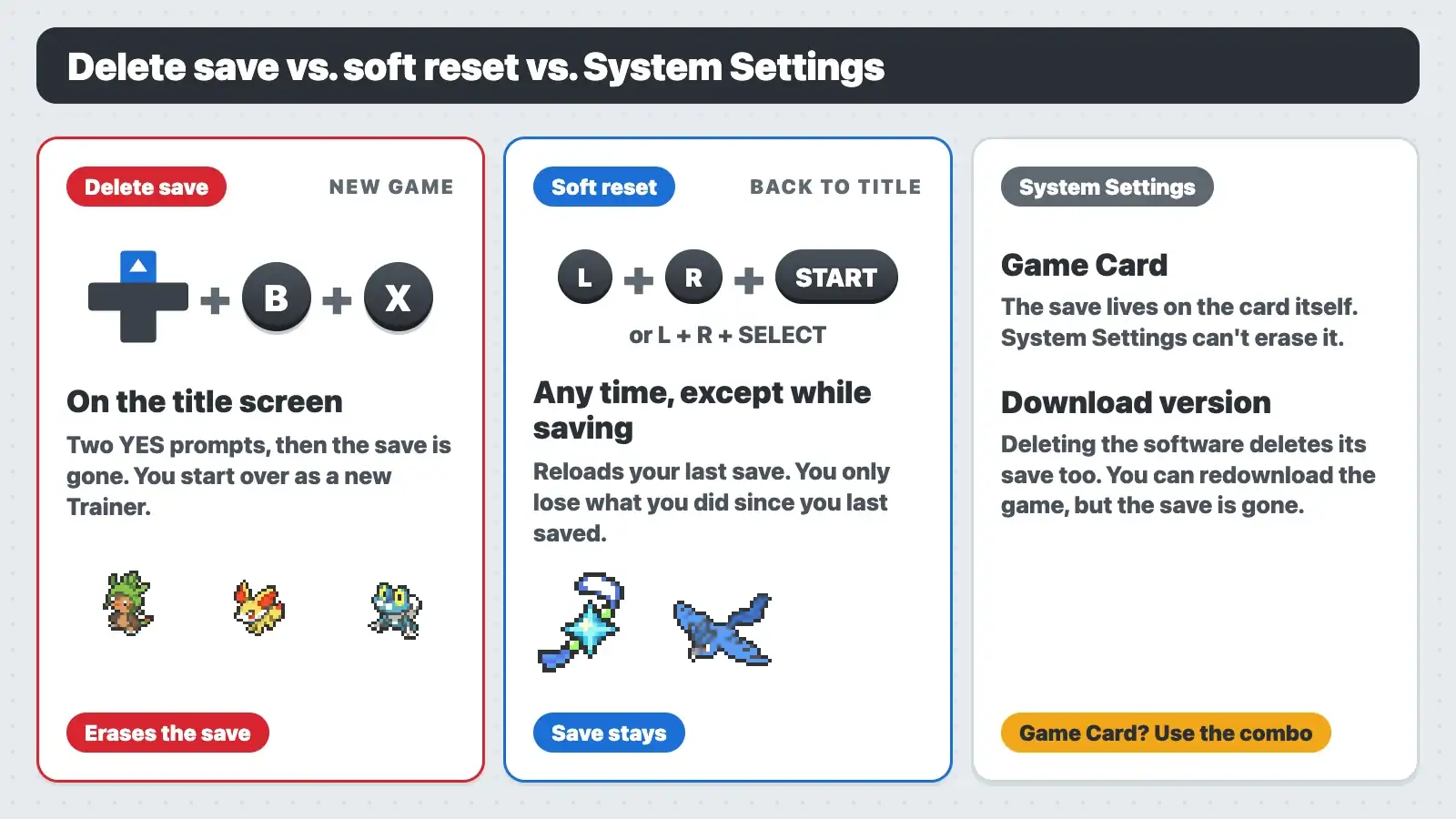
| Method | Buttons or menu | What happens | Save erased? |
|---|---|---|---|
| Delete save | Up + B + X on the title screen | Two YES prompts, then a brand-new game | Yes, all of it |
| Soft reset | L + R + Start, or L + R + Select | The game goes back to the opening and title screen | No. You lose only what you did since your last save |
| HOME Menu, Close | HOME, then Close | Quits the game | No |
| System Settings, Data Management (Game Card) | No option for it | Nothing. The save lives on the card | No |
| System Settings, Data Management (download version) | Delete the software | Removes the game and its save from the SD card | Yes, plus the game has to be redownloaded |
 Soft resetting is handy in X and Y for Pokémon you meet in set places, like your starter and gift Pokémon. It’s no use on Shiny-locked Pokémon. Xerneas, Yveltal, Zygarde, Mewtwo, the Snorlax on Route 7, the gift Lucario and the three legendary birds can never be Shiny, so don’t reset for them. See the Shiny-locked list. Don’t press the buttons while the game is saving.
What you lose when you reset
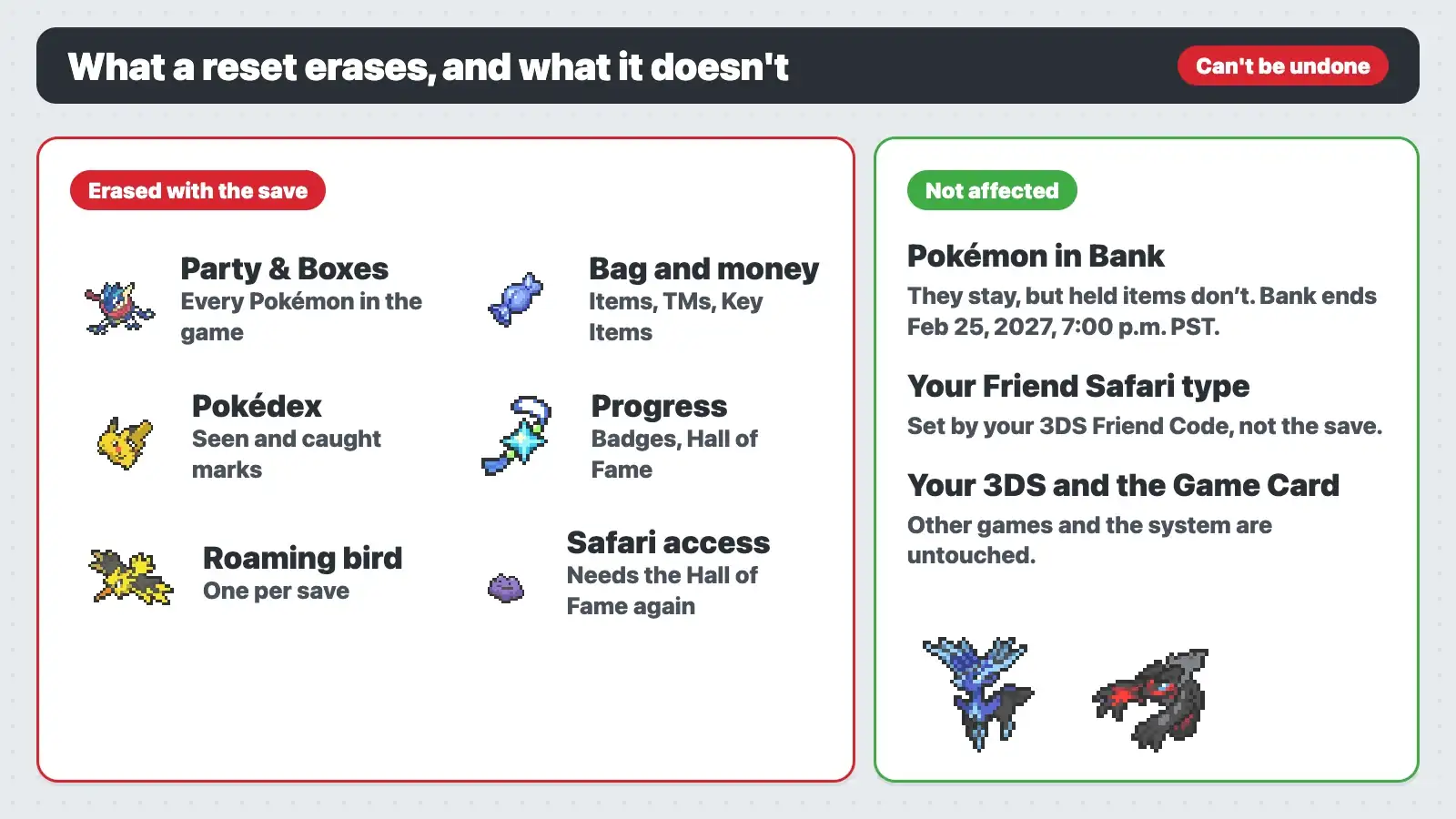
| Erased | Not affected |
|---|---|
| Your party and every PC Box | Pokémon already deposited in Pokémon Bank |
| Items, TMs, Key Items and money | Your own Friend Safari type, which comes from your 3DS Friend Code |
| Pokédex, badges, Hall of Fame and the Shiny Charm | Other games, your 3DS friend list and the system |
| Your Trainer, outfits, Pokémon-Amie and Super Training progress | The Game Card itself. It works like new |
| Unused Mystery Gifts and Wonder Cards | The game’s version (an installed update stays installed) |
Mystery Gift events for X and Y are over, so a gift you received in 2013 or 2014 can’t be received again. Online trading ended when the Nintendo 3DS online services closed in April 2024, so there’s no Wonder Trade or GTS to rebuild a team either. Only local wireless trades are left.
Before you reset: save your Pokémon
Move anything you want to keep off the old file first.
- Pokémon Bank. Deposit them in Bank before you erase, then withdraw them into your new game. Bank has been free since March 2023, but new downloads have ended. If you downloaded it before, you can still redownload it from the Nintendo eShop’s Redownloadable Software list with the same Nintendo Network ID. If you never downloaded it, this option isn’t available. Bank shuts down on February 25, 2027, at 7:00 p.m. PST.
- Pokémon HOME, only for Pokémon you won’t need in X and Y again. You can move Pokémon from Bank to Pokémon HOME with the HOME Premium Plan, but it’s one way. Pokémon moved to HOME can’t go back to Bank, so they can’t return to X or Y. Leave anything you want in your new game in Bank.
- Trade to another game. Local wireless trades still work with another 3DS. Trade to a second copy of X, Y, Omega Ruby or Alpha Sapphire, then trade back after you start over.
 Bank doesn’t store items. When you deposit a Pokémon that’s holding something, the item goes back to your Bag, and the Bag is erased with the save. To keep a Mega Stone or another valuable item, give it to a Pokémon and trade that Pokémon to another game with local wireless before you reset. Everything else in the Bag is lost.
You can’t copy a Game Card save on an unmodified 3DS. And the manual warns that copying a download version’s SD card data doesn’t work as a backup.
What changes on your new game
- You pick a language again. The manual says this is the only way to switch languages once you have a save.
- You choose from Chespin, Fennekin and Froakie again in Aquacorde Town. If you want help picking, read the best starter in X and Y. Your starter is also not Shiny-locked, so you can soft reset it for a Shiny.
- Your starter decides which bird roams Kalos after the Hall of Fame. Chespin gives Articuno, Fennekin gives Zapdos and Froakie gives Moltres. See what each starter locks in.
- You choose between the Jaw and Sail Fossil in Glittering Cave again. See the fossil choice.
- Your own Friend Safari type and its Pokémon stay the same, because they come from your Friend Code. Your access doesn’t carry over. You need to enter the Hall of Fame again to get in. The third Pokémon in a friend’s Safari also depends on that friend and on you having met in the PSS. Don’t count on your old unlocks coming back on a new save. With online play gone, you’d have to meet those friends again over local wireless. See how your Safari type is set.
- The Pokédex starts empty. Use the X and Y Pokédex and the Kalos map to plan your catches.
Game Card, download version and emulators
On a Game Card, the save is stored on the cartridge, not the 3DS. Put the card in another 3DS and you’ll see the same save. So the title-screen combo is the only way to wipe it, and Data Management in System Settings won’t list it.
On the download version from the Nintendo eShop, the same combo works and keeps the game installed. You can also delete the software in System Settings under Data Management, which deletes its save too. The eShop closed in March 2023, so you can only redownload it if you bought it before then. Use the combo.
On an emulator, the combo works if your keys are mapped to Up, B and X at the same time. If it doesn’t, close the game, open its save data folder from the emulator’s game list, and delete or move the save file there. Move it somewhere else first if you might want it back.
X and Y went up to Ver. 1.5 in April 2015, and none of the updates changed the delete-save combo. Ver. 1.1 fixed a bug where saving in parts of Lumiose City could stop you from continuing. If you have that bug on an old card, update the game. Don’t erase.
Should you reset?
Reset if you want a different starter or bird, want to replay Kalos with a new team, or bought a used copy with someone else’s save on it. A used card always comes with one save at most, so if you see CONTINUE on a card you just bought, the combo is how you make it yours.
If you only want one Pokémon over again, think twice. If you haven’t saved since you met it, a soft reset gets you another try. Once you’ve saved, a soft reset can’t undo it, and one-time Pokémon like your starter or a legendary can’t simply be caught again. In that case, a reset is the only way to redo them. And it’s a bad idea if your old Pokémon matter to you and you have no Bank and no second game to trade with. After the reset, they’re gone for good.
This page covers the 3DS games. Pokémon Legends: Z-A on Switch is a different game set in Lumiose City, and Switch saves are deleted from the system’s Data Management.
Resetting Pokémon X and Y FAQ
How do you start a new game in Pokémon X and Y?
Delete your save first. On a Game Card, that’s the only way. Hold Up on the +Control Pad, B and X on the title screen, then choose YES twice. The next time you start, it’s a new game.
What buttons delete the save in Pokémon X?
Why doesn’t Up + Select + B work?
That was the combo in the Nintendo DS Pokémon games. X and Y changed it to Up + B + X.
How do you soft reset Pokémon X and Y?
Hold L + R + Start, or L + R + Select. The game goes back to the title screen and your save stays as it was.
Does System Settings delete a Pokémon X cartridge save?
No. A Game Card save is stored on the card, so only the in-game combo can erase it. On a download version, deleting the software in System Settings deletes its save as well.
Can I have two save files in X and Y?
No. Each Game Card or download has one save. If you want two adventures, you need two copies of the game.
Will Pokémon Bank keep my Pokémon if I reset?
Yes. Pokémon already in Bank stay there, and you can withdraw them into your new game. Their held items don’t go with them. Bank closes on February 25, 2027, at 7:00 p.m. PST (03:00 UTC on February 26). Before then, move anything you want to keep long term to Pokémon HOME, but remember that HOME can’t send them back to X or Y.
Does resetting change my Friend Safari?
Your own type and its Pokémon don’t change, because they come from your 3DS Friend Code. But you need to enter the Hall of Fame again to get into the Friend Safari, and third-slot unlocks in friends’ Safaris may need you to meet those friends again.
Should I reset to get a Shiny Xerneas or Yveltal?
No. They’re Shiny-locked, along with Zygarde, Mewtwo, the birds, the gift Lucario and the Route 7 Snorlax. No amount of resetting makes them Shiny.